W2 Series
CNC Router with Oscillating Knife
For manufacturers who need to mill and cut their workpieces on one machine – without re-clamping or interrupting the machining process.
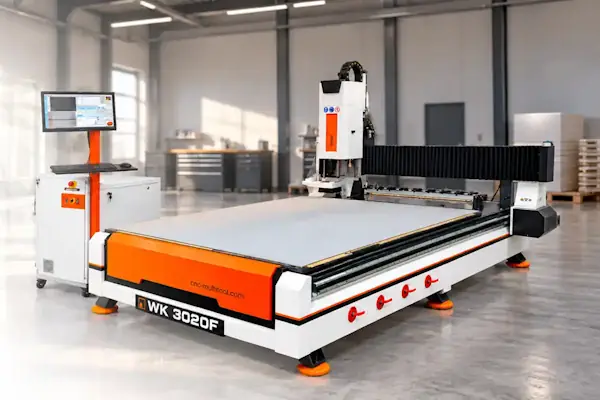

CNC milling and knife cutting in a single process
Milling and cutting the same workpiece – without changing machines or re-clamping. That is exactly what the W2 Series and its additional oscillating knife are designed for.
The workpiece stays on the machine table throughout the process. Changes between milling cutters and between the spindle and the knife are automatic. You can combine milling and cutting in one job and run jobs using up to 10 different milling cutters and one oscillating knife fully automatically. This saves time, reduces potential errors and simplifies production.
The W2 Series is a robust, fully capable CNC router supplied with a complete equipment package. There is no need to configure your machine from countless equipment options. Everything is coordinated, from the machine and software to dust extraction. Simply select the working size and receive a complete solution for your production.
As a complete-system supplier, we also provide the appropriate milling cutters, knives and tools for your applications – all from one source.
What can I make?
With the W2 Series, you can produce packaging inserts, acoustic elements, displays, upholstery and shaped foam parts from a variety of sheet materials.

Packaging & inserts
Make packaging inserts, tool inserts, case inserts and custom foam inserts from sheet materials. Pockets and recesses are milled, then outer contours are cut with the oscillating knife.

Acoustic elements
Produce wall absorbers, ceiling baffles, acoustic baffles, acoustic panels and custom-shaped acoustic elements from sheet materials. Cut contours and mill grooves, recesses or openings.

Exhibition stands & shopfitting
Produce displays, stands, back panels, cladding, presentation elements and custom components from different sheet materials. Milling and cutting operations can be combined directly.

Upholstery & furniture making
Make seat cushions, back cushions, foam inserts and custom upholstery foam shapes for furniture and seating systems. Mill recesses and shaped contours, then cut outer contours and openings with the oscillating knife.
What materials can I machine?
Machine foams, acoustic panels, plastics, wood-based panels, composites and many other materials – using a milling cutter or knife depending on the material. Aluminium can also be milled in light-duty applications; steel and stainless steel are not machined.
Foams
Machine PE foam, PU foam, EPP, EVA foam and cross-linked PE foams. Depending on the foam and contour, use a milling cutter or oscillating knife: mill recesses and cut suitable contours with the knife.

Acoustic panels
Materials include mineral wool, PET acoustic panels and felt. Suitable panels and felts are cut with the oscillating knife; milling depends on the material's structure and rigidity.

Plastic sheets
The W2 Series primarily mills PE, PP, POM, polyamide (PA), polycarbonate (PC) and PVC. Suitable cutters produce contours, pockets, grooves and holes; the knife is not suitable for every plastic sheet.

Wood & wood-based panels
Mill solid wood, MDF, HDF, multiplex plywood, plywood and film-faced plywood with the spindle. Depending on the material and panel thickness, produce contours, cut-outs, pockets and grooves; the oscillating knife is generally not intended for these materials.

Composite panels
These include GRP panels, GRP sandwich panels, honeycomb composite panels and laminated composite panels. Depending on the panel structure, machining is mainly performed by milling. Knife suitability depends especially on the face layers and core material.

Other materials
Films, technical textiles, fabrics and leather can be cut with the oscillating knife, depending on the material and thickness. The knife must be suitable and the material securely held on the machine table.

How can I machine my workpieces?
With the W2 Series, you can mill and cut your workpieces.
Milling
Use 2.5D and 3D milling to produce contours, pockets, grooves, holes and three-dimensional shapes. Up to 10 different milling cutters can be used automatically within one machining job.

Cutting
Cut external and internal contours with the oscillating knife. Cutting can take place independently or be combined automatically with milling in the same job.

How is the workpiece held in place?
The workpiece must be held securely on the machine table for accurate milling and cutting. The W2 Series therefore has a vacuum table with individually switchable vacuum zones and T-slots for mechanical clamping.
Vacuum clamping
Workpieces suitable for vacuum holding are placed directly on the table and secured using individually switchable vacuum zones.
Only the zones under the panel are opened. Unused areas are covered to minimise air leakage and maintain high holding force.
A vacuum film can also be used for air-permeable materials. The vacuum pump is included with the machine.

Mechanical clamping
If a workpiece cannot be held securely by vacuum, clamp it mechanically using the T-slots in the machine table.
Mechanical clamping can be used on its own or together with vacuum holding. Workpieces can be secured with clamping brackets or double-sided adhesive tape, for example.

Which machine should I choose?
The W2 Series is available in two working sizes. Both models have the same equipment and machining capabilities. Choose according to the dimensions of your panels and workpieces.

|

|
|
| Model | W2-2516F | W2-3020F |
|---|---|---|
| Working area L × W | 2,500 × 1,600 mm | 3,000 × 2,000 mm |
| Working height (Z) | 180 mm | 180 mm |
| Footprint L × W | 3,400 × 2,200 mm | 4,000 × 3,000 mm |
| Machine height | 2,000 mm | 2,000 mm |
How fast can I produce parts?
The W2 Series offers high speed reserves and is designed for travel speeds of up to 40 m/min. For normal operation, travel speed is deliberately limited to 20 m/min. Users can remove this limit themselves if required. Actual milling or cutting speed depends on the material, tool and contour.
Travel speed is how fast the machine moves between machining positions. Actual milling or cutting feed depends on the machining process. In milling, material, cutter and depth of cut are key factors. In cutting, the material, material thickness and contour are particularly important.
These high speed reserves ensure that the machine has sufficient performance even for demanding machining tasks.

How easy is the machine to operate?
The W2 Series is particularly easy to operate. This is made possible by a custom-developed software plugin that extends the machine software for combined milling and cutting and has been refined in real-world use over many years.
The software coordinates the milling spindle, automatic tool changer, oscillating knife and pneumatically controlled extraction hood. This makes complex milling and cutting jobs easy to control and run automatically.
For the operator, the process is straightforward: load the machine program, clamp the workpiece and start machining. The machine then performs the programmed steps, including all necessary tool changes.

What software is used?
The W2 Series is mainly used for 2.5D milling and cutting. Create your drawings in any 2D CAD software and save them in DXF format.
Import the DXF file into CAM software, where you define milling and cutting contours, tools and machining parameters. The CAM software calculates the toolpaths and generates the machine program using a suitable postprocessor.
We recommend VCarve because we have adapted its postprocessor specifically for the W2 Series. It can output milling and cutting operations in a single machine program.
For 3D milling, you need a suitable 3D CAD/CAM solution, such as Fusion 360 or SolidWorks with an appropriate CAM extension.

What happens if I need service?
If you have questions about the W2 Series or experience a technical issue, our service team is available directly. Many issues can be resolved remotely.
We assist with troubleshooting, machine operation and control by phone, email or TeamViewer. Many problems can be resolved this way without interrupting production longer than necessary.
If remote support is not sufficient, we supply the required spare parts or arrange an on-site technician visit.

Machine features
The W2 Series is designed for professional milling and cutting operations. Its robust steel frame, powerful servo drives and high-quality guide systems provide accurate, repeatable machining. The complete equipment package is matched to the automated production process.
Robust steel machine table
The machine table is made of welded steel sections. After welding, the structure is heat-treated to reduce internal stresses.
The mounting surfaces for the guides and gantry are then machined. This creates a rigid, torsion-resistant foundation for the entire machine.

Vacuum table
The W2 Series has a vacuum table with individually, manually switchable zones. This allows the clamping area to be adapted to different panel sizes. Zones that are not needed are switched off or covered so that the available vacuum is concentrated on the occupied area.
After assembly, each W2 machine mills its entire vacuum table surface itself. The complete table surface is produced on the individual machine, ensuring that it is precisely level relative to the milling spindle.
The vacuum pump is included with the machine. T-slots are also available for mechanical clamping.

Servo drives
Each CNC axis is driven by a 750 W servo motor. The servo drives enable rapid travel movements and precise axis positioning.
Position and movement are continuously controlled within the servo system. This enables both very small, precise positioning movements and fast, repeatable travel.

Linear guides
The W2 Series axes run on high-quality linear guides mounted on the machined support surfaces of the steel frame.
This guides the gantry and machining unit without play, accurately and repeatably over the entire working area.

Axis drives
The X and Y axes are driven by helical racks. These enable long travel distances, high speeds and precise positioning.
The Z axis is driven by a ball screw, ensuring precise, backlash-free height positioning of the machining unit.
Together with the servo drives, this provides precise, repeatable movement on all three axes.

Electrical cabinet, controller & computer
The electrical cabinet houses the machine controller, servo drives and electrical components in one central location.
The machine software runs on the machine computer. It processes the loaded machine program and passes the corresponding commands to the controller.
The controller processes these commands and operates the axes, milling spindle, tool changer, knife and other machine functions.
The computer has two network ports and a second SSD for data backup.

Milling spindle
The W2 Series features an air-cooled 9 kW milling spindle with a maximum speed of 24,000 rpm.
Tools are mounted using ISO30 toolholders with ER32 collets, allowing cutter shank diameters up to 20 mm.
Spindle speed is controlled by the machine software and can be adapted to the material, cutter and machining task for each operation.
The spindle has pneumatic tool clamping for automatic tool changes. The toolholder can also be released manually using a button directly on the spindle.

Automatic tool changer
The W2 Series has an automatic tool changer with ten tool positions. The required milling cutters are changed automatically, without operator intervention.
This also allows milling jobs using different tools to run completely automatically.

Tool length sensor
Before a milling job, the tool magazine is loaded with the required cutters. The tools are then measured automatically using the tool length sensor.
The actual length of each cutter is measured and stored in the machine software’s tool database.
The measured tools are therefore available for the current job and subsequent jobs. Remeasurement is only necessary when a tool is replaced or newly inserted.

Pneumatic oscillating tool
The pneumatic oscillating tool uses compressed air to move the installed knife rapidly up and down. It operates at up to 10,000 strokes per minute with a stroke of approximately 10 mm.
Depending on the material and cutting task, knives of different lengths, shapes and blade thicknesses can be used. Available blade thicknesses are 0.63 mm, 1.0 mm and 1.5 mm.
The oscillating tool operates with a compressed-air supply of 6 to 8 bar.
A material hold-down holds the material against the machine table directly around the knife and prevents the oscillating motion from lifting it. The knife length must therefore be matched to the material thickness.

Automatic switching between spindle and knife
The milling spindle and knife are mounted on separate, pneumatically positioned slides. The required tool is automatically moved into the working position for each operation.
When switching to the knife, the last milling cutter used is first automatically returned to the tool magazine. The machine then continues the job with the knife.

Automatic extraction hood
The milling spindle is equipped with a pneumatically guided extraction hood. Before the job starts, the hood is adjusted to the material height.
During machining, the hood automatically maintains this height independently of Z-axis movement. It therefore remains at the set height above the material even when milling at different depths.
For an automatic tool change, the extraction hood is raised and then returned to its previously set working position.

Compressed-air monitoring
The W2 Series monitors its compressed-air supply using a pressure sensor. If the pressure falls below the required level, the machine controller detects this.
The machine then automatically performs an emergency stop. This prevents pneumatic functions from operating with insufficient pressure and, for example, a collision during a tool change.

Automatic lubrication
The W2 Series has automatic central lubrication. The relevant lubrication points on the machine receive lubricant automatically.
Lubrication intervals can be individually adjusted and permanently stored in the lubrication controller.
This eliminates much of the routine manual lubrication and ensures reliable lubrication of the guides and drive components during machine operation.

Technical data

|

|
|
| Model | W2-2516F | W2-3020F |
|---|---|---|
| Working area L × W | 2,500 × 1,600 mm | 3,000 × 2,000 mm |
| Working height (Z) | 180 mm | 180 mm |
| Travel (Z) | 300 mm | 300 mm |
| Travel speed | up to 40 m/min | up to 40 m/min |
| Milling spindle | 9 kW / 24,000 rpm | 9 kW / 24,000 rpm |
| Tool changer | 10-position automatic | 10-position automatic |
| Oscillating tool | pneumatic | pneumatic |
| Vacuum table | Yes | Yes |
| Power supply | 400 VAC / 32 A, 50–60 Hz | 400 VAC / 32 A, 50–60 Hz |
| Footprint L × W | 3,400 × 2,200 mm | 4,000 × 3,000 mm |
| Machine height | 2,000 mm | 2,000 mm |
| Approx. machine weight | 1,800 kg | 2,500 kg |
| Technical datasheet |
Scope of delivery
The W2 Series is supplied as a CNC milling and cutting machine prepared for commissioning. The machine controller and essential equipment are already included.
Included equipment:
- W2 CNC milling and cutting machine
- Milling spindle with automatic pneumatic extraction hood
- Automatic 10-position tool changer
- Tool length sensor
- Pneumatic oscillating tool
- Vacuum table
- Vacuum pump
- Machine controller
- Control PC package
- Machine software with W2 plugin
- Automatic central lubrication
- Operating manual
- 12-month warranty

Options & accessories
The W2 Series is already fully equipped. Dust extraction, safety systems and application-specific milling cutters, knives and tools can be added as required.
Dust extraction system
A cyclone extraction system with fine-particle filter is available for the W2 Series.
Coarse chips and larger particles are collected in a metal container by the cyclone. Fine particles are separated by the fine-particle filter and collected in a separate plastic bag.
The extraction system can be switched on and off via the machine software and integrated directly into the machining process.

Safety fence
A safety fence with an interlocked door can be fitted to protect the machine area.
The fence prevents direct access to protected machine areas and is integrated into the machine controller.

Safety light curtain
A safety light curtain can protect the working area while allowing open access to the machine.
If the protective field is interrupted while the machine is operating, the safety controller responds and stops the machine.

Milling cutters
Cutter selection depends on the material, contour and required machining depth.
Different diameters, lengths and cutting geometries are used depending on the application. The tooling can therefore be matched precisely to the workpieces and materials.

Knives
The pneumatic oscillating tool accepts different knife shapes, lengths and blade thicknesses.
Blade thicknesses of 0.63 mm, 1.0 mm and 1.5 mm are available. Knife selection depends on the material, thickness and required contour.

Adjustable V-cut tool
The optional V-cut tool replaces the oscillating knife and produces angled cuts and V-grooves in foam panels, corrugated cardboard and composite panels. Available cutting angles are 0°, 15°, 22.5°, 30° and 45°. The tool is designed for materials up to 13 mm thick.

Creasing wheel for cardboard
The W2 Series can be fitted with a creasing wheel for cardboard and corrugated board. It creates fold lines without cutting completely through the material.
Packaging and folded parts can then be bent neatly along the prepared lines.

Additional toolholders
Additional ISO30 toolholders with ER32 collet fittings are available for the spindle.
The toolholders come in various lengths, allowing them to be matched to cutter length, machining depth and workpiece geometry.
Additional toolholders can be fitted with cutters, measured and saved in the machine software's tool database. Prepared tools are then available directly for different machining tasks.

Wireless handwheel
The optional wireless handwheel lets you operate key machine functions directly at the W2 Series without repeatedly returning to the control PC.
Move axes manually, set the workpiece zero point and perform reference runs. Its wireless connection lets you move freely along the machine.

Installation & commissioning
You can generally commission the W2 Series yourself. However, we recommend installation by our technicians and software and application training at our facility in Ilmenau.
On request, our technicians install and commission the machine at your site. All machine functions are checked, including the spindle, tool changer, oscillating knife and pneumatic extraction hood. The machine is then handed over ready for operation.
This is followed by instruction in machine operation.
On request, we also provide CAD, CAM and application training at cnc-multitool in Ilmenau, tailored to your individual requirements.

Frequently asked questions
Find answers to common questions about the W2 Series, from milling and cutting to operation, software, equipment and installation.
What materials can the W2 Series machine?
Foams, acoustic panels, plastics, wood-based panels, composites and other materials – by milling or cutting, depending on the material.
Can the W2 Series machine aluminium or other metals?
Yes. Aluminium can be milled in light-duty applications. Steel and stainless steel are not machined.
Can milling and cutting be combined in one job?
Yes. Up to 10 milling cutters and one oscillating knife can be used automatically in one job.
Can the W2 Series also perform 3D milling?
Yes. 3D milling is possible with suitable 3D CAD/CAM software.
What thickness can the oscillating knife cut?
Depending on material and knife, cutting depths up to 120 mm are possible.
Can the W2 Series produce V-grooves and angled cuts?
Yes. The optional V-cut tool replaces the knife and is suitable for material thicknesses up to 13 mm.
Can the W2 Series crease cardboard?
Yes, using an optional creasing wheel.
What is the difference between the two W2 models?
The working area: W2-2516F: 2,500 × 1,600 mm; W2-3020F: 3,000 × 2,000 mm.
What is the working height of the W2 Series?
Both models have a 180 mm working height.
How many cutters can the automatic tool changer hold?
The changer has 10 tool positions.
Which toolholders and cutter shanks can be used?
ISO30 toolholders with ER32 collets; cutter shanks up to 20 mm.
Can I use my own milling cutters and knives?
Yes, provided they suit the relevant toolholding system and machining operation.
How fast can the W2 Series mill and cut?
This depends on the material, tool and contour. Travel speed is limited to 20 m/min in normal operation, but users can remove this limit themselves.
How are air-permeable materials clamped?
A vacuum film can be used in addition to vacuum clamping for air-permeable materials.
What compressed-air supply does the W2 Series need?
The W2 Series requires 8 bar compressed air.
Does the W2 Series need a separate dust extractor?
An external dust extractor is recommended for milling. The automatic extraction hood is included with the machine.
Can an existing extraction system be used?
Yes, if it is suitable for the machine and the dust produced.
Are milling cutters and knives included in the delivery?
No. Tools are selected for the application and can be purchased from us.
Which CAD software can I use?
For standard 2.5D work, any 2D CAD software with DXF export can be used.
Which CAM software is recommended for the W2 Series?
We recommend VCarve with our specially adapted postprocessor.
Can I use my existing CAM software?
Yes, provided a suitable postprocessor is available for the W2 Series.
Can I commission the W2 Series myself?
Yes, in principle. However, we recommend installation by our technicians.
What training does cnc-multitool offer?
On request, we offer CAD, CAM and application training at our facility in Ilmenau.
How does remote maintenance work?
Our service team can access the machine computer via TeamViewer when needed.
Are spare and wear parts available?
Yes. Spare and wear parts are available directly from cnc-multitool.
See the W2 Series in action

See the W2 Series demonstrated in Ilmenau and watch milling and cutting on one machine in real-world operation.
Discuss your materials, panel sizes, workpieces and production tasks with us. Together, we can determine the appropriate machine size, tools and equipment for your production.
We can also select the right dust extraction, safety equipment, CAM software, milling cutters and knives for your application.
Request a demonstration
Consulting
personal and
professiona

Testing
Experience our
machines live
Planning
Customized solutions
for your production.
Support
there for you even
after your purchase